
Bhu Naksha Balangir
How to open a Bolangir plot on Bhu Naksha Odisha, step by step: the district as the portal lists it, the Odia lists, and what the map can and cannot tell you.
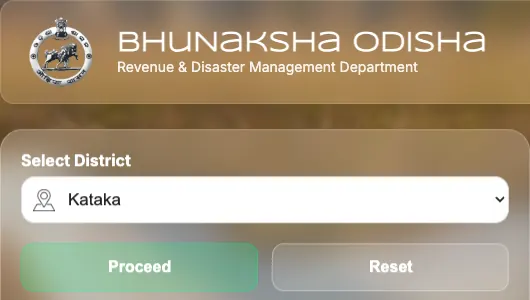
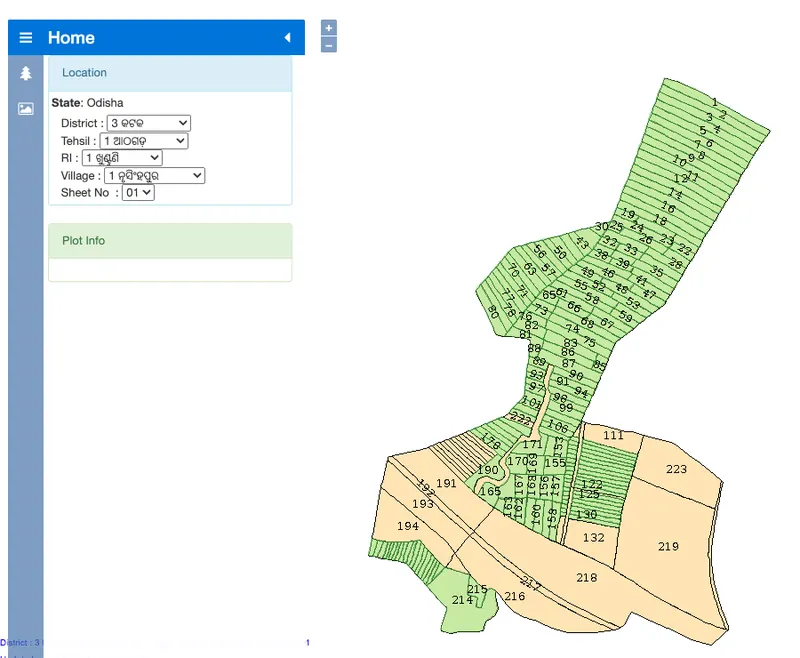
Bhu Naksha Odisha (bhunakshaodisha.nic.in) is the Revenue Department's plot-map portal. To see a Bolangir plot, choose Balangir (the portal's spelling of Bolangir) on the portal and press Proceed; in the map that opens, pick the tehsil, the RI circle, the village and the sheet, and type the plot number. The map shows where the plot lies and its boundary, and its Plot Info links to the plot's Record of Rights, which names the holder.
How to open a Bolangir plot on Bhu Naksha
- Open Bhu Naksha Odisha at bhunakshaodisha.nic.in.
- Under Select District, choose Balangir (the portal's spelling of Bolangir) and press Proceed. The map opens in a new tab.
- In the map's Location panel, pick the district again, then the tehsil, the RI circle, the village and the sheet number. These lists are in Odia; the tehsils of Bolangir are listed below in both spellings.
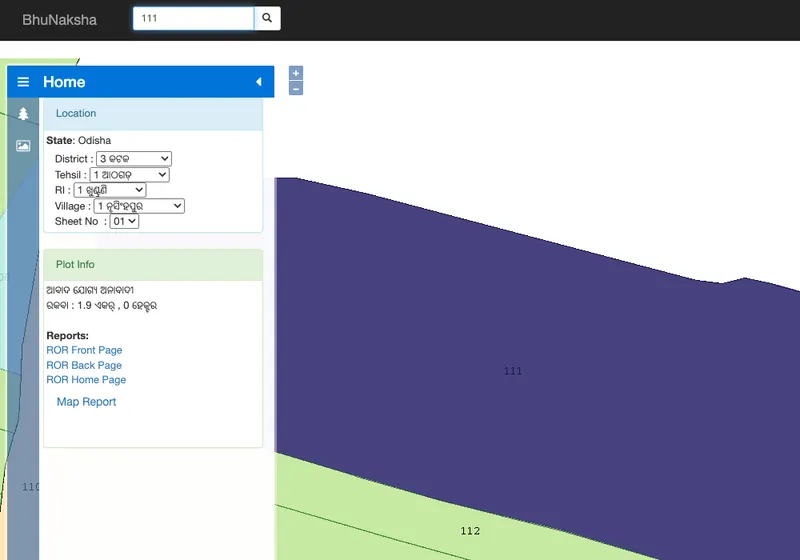
- Type the plot number into the Plot No. box and search. The map moves to the plot and outlines it, and Plot Info gives its land class and area, with links to its Record of Rights.
What Bhu Naksha shows, and what it does not
- The village map, sheet by sheet: every plot's boundary and its plot number.
- The plots around yours, so you can see what borders it on each side.
- For the plot you search, Plot Info gives its land class and area, in Odia, and links to the front and back pages of its Record of Rights on Bhulekh, which name the holder.
- It does not show a mortgage, a sale not yet mutated or a court case: loans and sales are in the Encumbrance Certificate, and cases are in the court records.
- The portal says its maps are for viewing only and not for any legal purpose, and that neither the National Informatics Centre nor the Revenue and Disaster Management Department is responsible for their accuracy.
When the plot does not show
- Bolangir is not in the list: the portal lists it as Balangir.
- The names do not match what you typed: the map lists tehsils, RI circles and villages in Odia.
- The plot is not on the sheet: a village map can run over several sheets. Try the other sheet numbers listed for the village.
- The map does not load: each group of districts is served from its own map server. Try again later; the Record of Rights for the plot opens from the district page meanwhile.
- The map and the Record of Rights disagree: the portal does not vouch for the map, so rely on the Record of Rights and ask the Tahasil office.
The tehsils of Bolangir, in both spellings
The map lists them in Odia, and the district as ବଲାଙ୍ଗିର. These are Bhulekh’s spellings; the map’s can differ by a mark.
- Agalpur: ଆଗଲପୁର
- Bangomunda: ବଙ୍ଗୋମୁଣ୍ଡା
- Belapara: ବେଲପଡ଼ା
- Bolangir: ବଲାଙ୍ଗିର
- Deogaon: ଦେଓଗାଁ
- Kantabanji: କ଼ଣ୍ଟାବାଞ୍ଜି
- Khaprakhol: ଖପରାଖୋଲ
- Loisingha: ଲୋଇସିଂହା
- Muribahal: ମୁରିବାହାଲ
- Patnagarh: ପାଟଣାଗଡ଼
- Puintala: ପୁଇଁତଲା
- Saintala: ସଇଁତଲା
- Titilagarh: ଟିଟିଲାଗଡ
- Tushra: ତୁଷରା
To see who holds a Bolangir plot, open its Record of Rights on the Bolangir land records page: pick the village, then the Khatiyan or the plot number.
Checking it before money moves
You can read the land record from a name or a plot number, and search the same name across the District Courts, the High Court, the tribunals and the Supreme Court. Both answer in minutes and cite the page each fact came from, so an advocate can check the source rather than take a summary on trust.
100 credits free · no credit card required
Related questions
- Bhu Naksha Jagatsinghpur: How to See a Plot Map Online
- Bhu Naksha Jharsuguda: How to See a Plot Map Online
- Bhu Naksha Ganjam: How to See a Plot Map Online
- Bhu Naksha Khordha: How to See a Plot Map Online
- Bhu Naksha Dhenkanal: How to See a Plot Map Online
- Bhu Naksha Kandhamal: How to See a Plot Map Online